How to tell Eudora 5.2 to use SSL
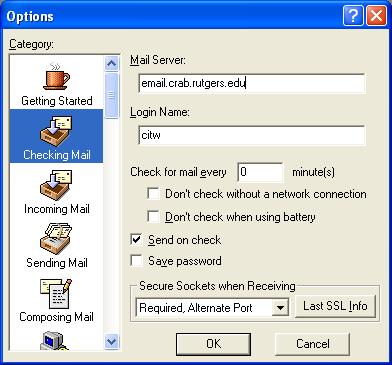
1. Select Tools ---Options---Checking Mail.
2. Set the Mail Server setting to the following and then click OK:
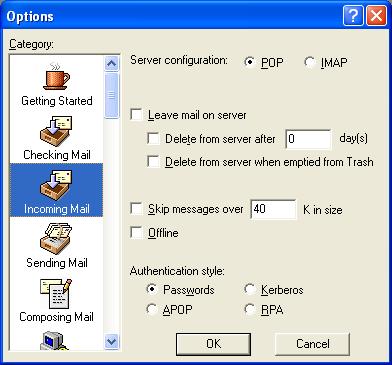
3. Select the "Incoming Mail" category
4. Check your mail
If you still have trouble please contact Harold Winshel.
2. Set the Mail Server setting to the following and then click OK:
- Mail Server: email.crab.rutgers.edu
- Login Name: Enter your email username
- Secure Sockets when Receiving: Change the option to Required, Alternate Port
3. Select the "Incoming Mail" category
- Server configuration: set it POP
- Authentication style: set it to Password than click ok.
4. Check your mail
If you still have trouble please contact Harold Winshel.