MATH on the WEB: LaTeX Lesson 7
More about LaTeX
- Learn about page styles in LaTeX
- Learn about macros in LaTeX
You may want to change the page style of your LaTeX document.
This can be done with the commands \pagestyle
and \thispagestyle. The command \pagestyle
changes the page style of the current page and and of all subsequent
pages, whereas the command \thispagestyle
changes only the page style of the current page.
The standard LaTeX page styles are:
- empty
- Both the header and footer are empty
- plain
- The header is empty and the footer contains the page number
- headings
- The header contains information determined by the document
class and the page number; the footer is empty
- myheadings
- Similar to headings, but the user controls the header
you can use the \pagenumbering{style} command
to select a display style for the page numbers. The default style
is arabic, but for an introduction you might want to
use roman, which gives i, ii, iii, iv, and so on. Also
available are Roman, Alph and alph.
It is easy to guess what they do>
To get a page break, use the command \clearpage.
One of the most useful features of LaTeX is its easy-to-use cross
reference system. To allow cross-references to some element of your
document, you can assign the element a "key" given by a "key-string",
which is a string that can consist of letters, digits and punctuation.
That key-string can later be referred to generate a cross-reference
elsewhere to the original element. The elements that are commonly
labelled are equations, sections and subsections (etc.), figures and
tables.
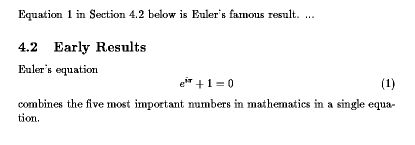
Here is an example of an equation with a label and a reference
to the equation. This is taken from Section 4.2 of LaTeX,
a Document Preparation System by Leslie Lamport, ©1994,
1985 by Addison-Wesley.
Equation~\ref{eq:euler}
Section~\ref{sec-early} below
...
\subsection{Early Results}
\label{sec-early}
Euler's equation
\begin{equation}
  e^{i\pi}+1 = 0 \label{eq:euler}
\end{equation}
combines the five most important numbers in mathematics in a single
equation.
The results, depending on what numbering scheme was chosen in the
document preamble, might look as follows:
Finished?
If you have done all the above activities,
and there is still time left, here are some other activities you can do.
- Help someone else.
- Think about the projects.
- Read net news. In Netscape, click on the Newsgroups button.
- Surf the Internet.
You should have time to start on these during class.
- Explore any mathematical topic that interests you, with a view
to using what you can find out about it as part of a project
- Keep a list of links to any mathematical sites that you think are
worth revisiting. Include the list of links either on your very
basic Web page or as a separate document linked to that Web page.
- For Wednesday, Novemeber 10, write a short paper in LaTeX
designed to teach a first year student the how and why of
completing the square. There are many Web pages that deal with
this, but most are not impressive, and a few actually have
mistakes in them. The paper should be one-and-a-half to two
pages in length, or so. Make sure that you have at least three
numbered equations in your paper, and that you have at least
two cross references to your equations (so these will need
labels). I hope that you will also use the sectioning command.
/ Home / Contents /
email to:Martin Karel